Sunday, May 31, 2015

Swimming Into the End

We are now 1 full day and 3 half-days away from the end of the year school. Seriously, it's flying!

Before I get into all the fun projects students have been working on...I need to take a minute a brag on a specific group of mine. I have two Algebra I classes (8th graders taking the 9th grade course) and a total 36 students between the two. We recently had our End Of Course (EOC) test that counts as 20% of student's final average for the year. Students need an 85% average for the year in order to receive the high school credit and continue advance Math courses in high school. So, to say this test is a big deal would be an understatement. Well...onto bragging: out of my 36 students (drum roll please) there was a 100% passing rate! All 36 students passed the test. We had 1 D (with a 76%...1 little point from a C), and 22 A's...12 of which were 100%!!! I am beyond proud of these kids. They worked their little booty's off and put in some serious time and work this year. I am speechless with how wonderful they did on this test...it's unbelievable! I of course had to spread the word on Social Media ;)


While my Algebra kiddos were in straight beast-mode for the EOC, my Pre-Algebra buddies were working super hard on reviewing linear equations. They were given 12 little problems using either two coordinates or a coordinate and a slope. Students were to write the linear equation representing the line in slope-intercept form. Once students had their 12 equations (and were correctly checked by me), students were given 12 coordinates and a piece of large graph paper. Students then plotted the coordinates in order, connected the dots, and matched up their equations to which line it represented.


Once all those steps were complete, students then decorated their picture. We even had our own little "Fishy Fashion Show" and the entire team including our four teachers, got to vote on their favorite. Here are some of the fabulous participants in our show:


After a vote by our entire team (69 students and 4 teachers; and we even had an assistant principal vote!) we had a winner! With 34% of the votes...Our winner.....


Students really seemed to enjoy this little project. It would be great to do before End of Year testing to review writing linear equations and matching equations to specific lines. If only it didn't take about a week (a very, very relaxed week) to complete ;)

After their review of linear equations, PreAlgebra kiddos got to review angles created with parallel lines and transversals. Students were given a blank piece of white paper with a few guidelines. Students were to create a neighborhood/town scene by drawing two parallel line streets with transversal streets. With the angles that were created, students were then to strategically place various components of a neighborhood/town. For example: students were to place houses on alternate interior angles, a school and a building on corresponding angles, etc. 

There were several students, my non-color fans, who did the simple assignment exactly as decorated, nothing flashy...but still perfect! Then there were of course my artsy kiddos who really got into the assignment and drew everything from parks, parking lots, trees, and even lakes/ponds. Students did a great job on this review assignment as well!  


So between my Algebra kids working on their EOC review and test, and my Pre-Algebra buddies reviewing various concepts, these past two weeks have been very productive! We are into our final week of school beginning tomorrow (can you believe it?)! My Algebra kids are wrapping up a quick quadratic review project involving Angry Birds so I'll be sure to share their final products, as well as, our Moving-On Ceremony this time next week! Until next time... :)

Tuesday, May 19, 2015

The Beginning of a Wrap-Up

It's testing season. When I say "testing season..." I mean 3 English/Reading/Writing ACTs, Math ACT, Science ACT, Science PASS, Social Studies PASS, English I EOC, Algebra I EOC, and all 4 content area SLOs. Yep...some of my poor little 8th graders will take 13 tests all within the month of May. Not to mention...those students who elected to take Spanish or French I during their Academy time, will have their end of course test during this month as well; up to 14 tests!!

Around testing, it gets very challenging to see some of my classes, get review material in, and keep students interested in doing Math following a few hours of testing. So needless to say, I need to create a way for students to review Math materials...given the idea that I may not see them but for twenty to thirty minutes some days (if I get to see them at all), and given that I need to make sure they are at least a little interested in what I'm having them do.

My idea...Let's use the iPads! Kids love those things right? :)
I went through our curriculum, textbooks, and lessons and came across 12 chapters for each Algebra and PreAlgebra class that we've covered throughout the year. Within my 2 Algebra and 2 PreAlgebra classes I divided kids into groups of two or three in order to cover all 12 chapters of material. Groups then drew chapter numbers out of a hat to determine the chapter their group was responsible for. For example my large Algebra I class of 26 students had 9 groups: 8 groups of 3 and 1 group of 2. My smaller Algebra class (of only 10 students) had 3 groups: 2 groups of 3 and 1 group of 4. Within both classes, there were 12 groups that would cover the 12 chapters of material.

Once students had their groups and their chapters they were ready to get started. Students had a 3-piece checklist. Students were to create their own review station for their chapter. Within their station they would create a Vocabulary Page, a Note Page, and a 5-to-10 question quiz. Students were to use their iPads and any APP of their choice to create the three components. It was awesome to see student's creativity and personality come through in the various ways they chose to represent their chapter. Check out some of the submissions:

Click here --> Chapter 5 Entire Station

I even had a group great their own website holding all their information --> Click Here for Chapter 7

One of the group's vocabulary page with pictures. 
Another vocabulary page with student examples.

An example of a quiz created by one of my Pre-Algebra groups!

After students created their "Review Stations" (I gave them three class periods), they then spent the last two days of the week using their iPads to virtually visit all the stations. Students took the notes, memorized and reviewed the vocabulary and then completed the station's quizzes. Students completed the quizzes using online quiz websites, Kahoot!, Notability, and Pages apps. Students then took screenshots of all quizzes and uploaded into the corresponding Station Quiz under Schoolwork in our My Big Campus groups. 

Students really seemed to enjoy this way of reviewing rather then simply getting packet after packet and going through what feels like a billion multiple choice questions! Within the next weeks Algebra students will be reviewing those mounds of packets using their Algebra standards as we move towards their EOC (End-Of-Course test). We will play review games each day with a different standard. My plans are Kahoot!, Survivor, Jeopardy, and ZAP! Pre-Algebra students will begin a project reviewing finding slopes of lines through two points, and writing the equation in slope-intercept form. I'll be sure to post their projects and progress! I can't wait to see their artsy-crafty side. :)

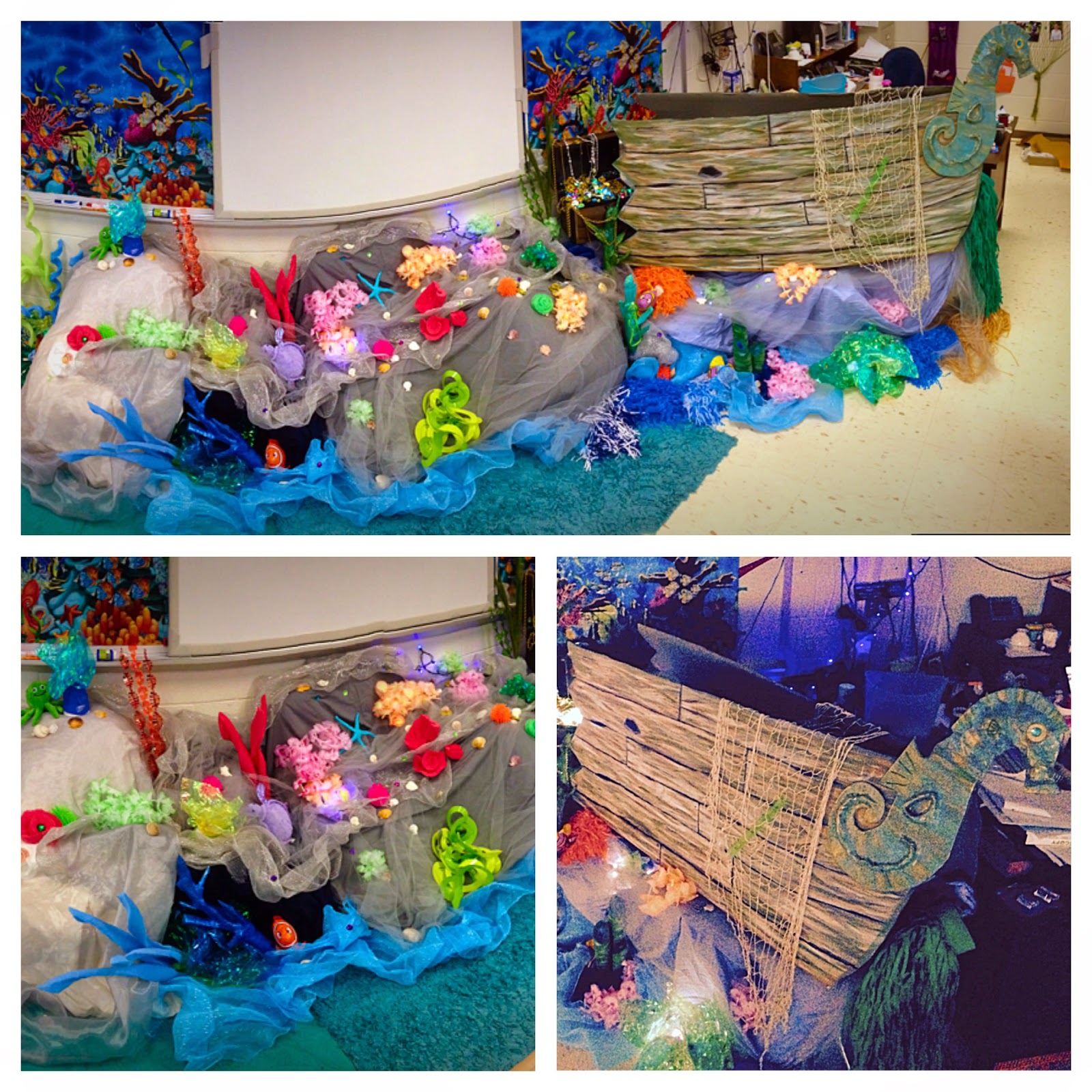
As we are reviewing...we are also getting prepared for our annual 8th grade Charleston Field Trip. My Social Studies teammate is busy preparing her room for those students staying at school and participating in Virtual Charleston. Her room is the South Carolina Aquarium where students will learn about South Carolina Pirates and The Hunley throughout their Virtual Charleston experience. Just check out how crafty and fabulous this underwater-classroom looks!


Yes...She really hand drew and painted this! 

A panoramic view of the coral reef and ship wreck! 


So basically my Social Studies teammate is awesome! Super creative, super imaginative, just overall fabulous! She did all of this with things laying around her room or from the dollar store! Super thrifty!! Well, now it's time to start decorating my room... Barn Quilts here we come ;)

Before I leave for the post...It's time to brag on my little softball team from this year. We had an amazing season, finishing 2nd in the County Championship to York Middle School. This year's girls are a beyond talented group of girls that I have had the pleasure of working with for the last 2 years. I'm not sure how we are going to manage next year without our 11 8th graders...but we are excited to see them succeed and do well at the high school level. I will miss these girls, but look forward to next season as my 2 7th graders become positive team leaders. 


Something to look forward to in the next post...My Pre-Algebra kids create a linear fish scene, my Algebra students get introduced to the game ZAP!, and we virtually visit Charleston for the end of the week. Loads of fun coming up... Until next time.... :)


Sunday, April 19, 2015

CountDown is On!

So apparently this year just wants to fly by. It's already mid-April! My little softball season is down to 4 total games left, my little 8th graders are 1 week away from their ACT End-of-Year test, and we are roughly 6 weeks away from the last day of school. I'm getting a little emotional :(

Our March Madness Book Battle competition through My Big Campus has even come to close. Our Championship round involved a head-to-head match-up of The Hunger Games and Divergent. The Hunger Games was the reining champion, but with 58% of the over 300 total votes by students and teachers, Divergent pulled off the upset for this year's Champion. Congrats Divergent (even though my personal vote went towards The Hunger Games ;) )

In my last post, all about March's good points, I totally forgot to mention that this March held the Ultimate Pi Day! Of course, as a Math teacher, I had to do something to celebrate this occasion with my students. Since the date actually fell over a weekend, I wanted to make sure students gave the the the attention it deserved ;) Therefore, my Math teammies and I came up with a Ultimate Pi Day Collage project for students to complete over the weekend. With our 1:to:1 iPad plan for students in our district, students were instructed to take pictures of Math in real-world examples they saw throughout the weekend. The specific pictures they had to find were given as the following:
3. - Places where the Pythagorean Theorem could be used.
1 - Selfie (so we could identify who made the collage)
4 - Non-Linear Functions
1 - Set of Parallel Lines
5 - Linear Functions.


Students took their pictures over the weekend and then had class time Monday to use an Photo app of their choice to put the pictures into a collage. Students also had a give a brief description as to why the pictures they picked represented the given concept. Not to mention, every collage they put inside of the final collage earned them an extra point! The students really enjoyed this activity and putting their own personal spins and touches on it. We got some really awesome collages to show off!

Along with Pi Day Collages, students got to use their iPads this week as we were beginning to wrap-up new material. Again..we only have 1 week until our END OF YEAR TEST! Can you believe it? It's just ridiculous.

Back to reality...In our Algebra class we were "re-hitting" the Real Number System and it's Properties. We covered this material at the beginning of the year. Now when I say beginning of the year...I mean like way September time, so wwaayyy beginning of the year. Instead of taking two days to review old-school note style something that these kiddos have already studied (not just this year, but even in 7th grade!), I decided to give them a little bit of ownership in their notes. Students were given the types of numbers (Whole, Natural, Real, Irrational, Rational, and Integers) as well as the properties (Commutative, Associative, Distributive, Inverse, and Identity). Students were to use any iPad app of their choice (many picked Notability, Keynote, or Pages) and define the type of number or property and give an example.

There were several differences in student turned in material, not only in apps, but in colors, pictures, details, etc. It was interesting to see the wide range of note-taking I received. Everything from black and white note pages, to full-out close to 30 page slide shows. I am still fascinated with the amount of time and effort students put into creating things on their iPads. I love to see the amount of quality and skills they have when they are given the chance to create something on their own with little instructions and guidelines.


After creating their notes, students used what they created to complete a homework assignment that had two parts: 1) students were given an example and had to identify what property is was displaying. 2) students were given a completely solved equation, step-by-step, and students had to label each step and what property was used to solve the step. I even got the comment the next day "My notes really helped me do my homework." (Although this is what I go for everyday! Haha)

I am amazed at how students are using their iPads and how creative they can be. I am eager to see the quality of projects and work that I will receive following our END OF YEAR tests (have I mentioned that it is in 2 weeks?). I am looking forward to seeing how creative students can be when not limited to textbook learning. I've got some pretty exciting things planned and I'll be sure to share!
Until next time... :)

Wednesday, March 25, 2015

March is Pretty Awesome!

It's that time of the year again! March is one of my favorite months for a couple reasons. Of course the first one..totally sappy...but it's my hubby's birthday. Not to mention it's his 30th this year! Whoop Whoop!

March is also one of my favorite months because of March Madness. I love basketball and I absolutely love the competition and excitement of March Madness. It is always super exciting and super interesting to see who makes it through the rounds, where the upsets come from, and the level of determination among the players, coaches, and schools participating. It's always fun to make brackets, see who wins, and have friendly wagers on the tournament. Currently for this year, this girl is winning our ESPN Tournament Challenge with 440 points, while my hubby only has 390! I don't want to speak too soon, but this girl may be winning a home-cooked three course dinner!

But anyways...to totally relate this back to school, I had to bring the competition in some way to Clover Middle! Last year I had an idea...totally stolen from Pinterest...to make a School Battle of the Book Competition. Last year we used the old fashion bulletin board to create a March Madness bracket between the top 16 books checked out of our library. Mrs. Boheler, our media specialist, pulled the list of the top books, and we created a head-to-head battle for the books to compete against each other. Check it out: *Shout out to TimeHop for the photo!*


To get students to vote, we placed QR codes throughout the school and emailed out URL links that allowed students to complete a Google Form and submit. Each week students voted for their favorite books out of the list until books were narrowed down to two and competed head-to-head. Our Book Champion last year was The Hunger Games, my personal favorite. :)

This year we are 1-to-1 with students all having their own iPad. Mrs. Boheler, Mrs. Lefler (our technology guru), and I wanted a way for students to use their iPads and a program that they were move familiar with rather than Google Forms. Mrs. Lefler had the idea of students using My Big Campus to complete surveys. My Big Campus is the program that all teachers use throughout the district and students are comfortable with posting to discussion boards, submitting school work, etc. Mrs. Boheler took care of putting all grade level students into their own group through the media center. Her groups were based on their graduating year (ex: Class of 2019, Class of 2020, and Class of 2021). Mrs. Boheler also added me as an administrator to the groups so that we could assign the March Madness Book Battle through schoolwork to all students.


After the groups were created, I made a "Simple Assignment" survey and listed the top 16 books for this year's checkout rotation. There were many books that were repeated in the top 16 from last year. It's interesting to see how popular some books are year after year. The first survey asked students to vote for their top 8 books out of the list to move on in the competition. Students had from Monday to Sunday to complete the survey. 


As an administrator, Mrs. Boheler and I could log in at any time to see the Live Report under options for the school work. When we would look at the Live Report we could see how many students have completed the survey, how many students were left to vote, and the current vote percentage for each book by grade level. 


On Monday morning the votes were tallied among grade levels and the top 8 voted for books were moved onto a new survey. The new survey was sent out this Monday and students again have until Sunday to complete their votes. 


Students are really enjoying the voting process and by doing the survey through My Big Campus, I feel as though more students are participating! We definitely have had more participants each of our two weeks this year compared to last year. I definitely think it helps that students are also competing for an extra 10 minutes of recess if they are the grade level with the most participation. Hey...a little reward never hurt anyone right?


For our first completed week of the March Madness Book Battle we had approximately half the students in the school complete the survey and vote for their books! With only two and half days into this voting week, we have already had over 162 students vote! Looks like March Madness is as much of a hit with the kiddos as it is with me ;)


Along with the hubby's birthday and March Madness, March is pretty awesome because it's finally time for our Softball season to kick it into gear! I have a fabulous group of 14 girls this year. Last year, with 9 7th graders who all returned this year as 8th graders, we made it to the York County Championship and lost a tough one to York Middle School. We are hoping and planning to make it back to the championship and have a different outcome this year! 


I will be sure to update on the March Madness Book Battle, the Championship book, and our softball season (currently starting out 3-0!), so keep looking! Until next time... :)

Sunday, February 22, 2015

Plickers...What?!

It all started at a dinner with friends. Isn't that how every good story starts? :)

Well, this is a great story about learning something new. My husband and I were at dinner with some friends from our old school Cramerton Middle the other week and we were, of course, talking about school things. One of my best friends, Candace was telling me about a technology based professional development they had on something called Plickers. Since I had never heard of this before, of course I had to ask her for some more details.


Candace told me that Plickers is a web-based program that teachers can use as quizzes, exit tickets, etc. She told me that students are assigned "cards" to use in answering multiple choice or true/false questions. Once students have their "cards," a teacher-created question is shown on the front board, through the website, and students hold up their card with their answer choice pointing up. Then teachers, after downloading the Plickers App (Hint: only on iPhones or Andriods...not on iPads yet) can scan the class and the cards will register each students' answer choice.

I thought this was something super interesting and of course had to do a little research before using in my classroom. I did some hunting and online searching and ...
Here's a low down picture look at the super easy process:
First, Teachers create their class (or classes) on Plickers.com

Not my classes, but you can see how each student is assigned one number which correlates to a specific card.

I created my classes by my class periods. Therefore, I have 4 total classes and assigned students their unique card simply by alphabetical order. 

Second, Teachers create a quiz, exit ticket, or question that they want students to answer. Questions can either be multiple choice or true/false.

The differences between just the question appearing, or showing the student list.

After your quiz is created, you choose which class to assign the question to. Once it is displayed on the board (through the website), there are several screen variations you can show. You can have just the question and answer choices or you can have a list of student names visible along with the question. 

When you are ready for your students to answer and the question is on the board, simply open the Plickers App on your phone (again only iPhone or Android...bummer iPad peeps). 
The app!
Once the app is open on your phone, click on the class answering the question at the time, open the intended question also on your phone, and you'll be ready to collect responses! 


Now is the time for students to hold up their unique card with their answer choice on the top. For example if they want to answer A, students will hold their card up so that the A side of the card is on the top. 

Students holding their unique card with their answer choice pointing towards the top!
Once students have their cards up and ready to be scanned, use your open Plickers App on your phone to slowly scroll around the room. The app will record each students' response by recognizing their unique card and answer choice. The app them compiles the results for you! 


It's awesome, brilliant, super easy, super tech-friendly, everything! I could not believe how easy it all was once I got signed into the website. Having never used Plickers before, I was pleasantly pleased with how easy it was to figure out on the website, get the questions entered, and get the program working in my class. 

Once I decided to jump all in with Plickers I had to make a central location where students could get their unique Plicker cards on a daily basis. Another great thing about Plickers is that one card, for example card 1, can be assigned to one student per class. Therefore, every student at the top of the alphabetical list per period, can share a card. No 4 copies of cards to keep up with!! Whoop Whoop!

I created a little homemade board area and placed it near our calculators that are already numbered for students to use daily, and simply Velcro-ed the cards to the board. This way students can easily take their card when they grab their calculator, whether we are using it throughout the class period or not, keep it at their desk, and return to the board when returning their same numbered calculator. 

My homemade Plickers board!

The calculator and Plicker pick-up corner in my classroom. 


I can not wait to actually use the Plickers in my room this upcoming week. My intentions were to use them last week, but with the ice we had and the week of 2-Hour delays, our schedules were a little crammed to say the least. I am super looking forward to a full-normal week (as normal as 8th grade can be :) ) of school, classes, lessons, and using Plickers! I'll be sure to update with how it works (although I'm sure it will be a hit!) and my students' thoughts and feelings about the new exciting and interactive way of doing exit tickets. 

Until next time... :)